Activation tested in Hungary · 31 October 2026 · Guide updated 2 November 2026
Activating Gemini through GamsGo: Our Three-Month Trial Experience
We used GamsGo promotional credit to purchase a Gemini gift offer, redeemed it on our own Google account, and cancelled its automatic renewal. Here is what the process actually showed us.
Gemini 4 Argon: what Google announced
Google’s 13 October announcement describes Gemini 4 Argon access for Google AI Pro and Ultra subscribers, with improvements in complex reasoning and coding. It also introduces a Tasks workflow and describes Antigravity’s coding interface in the Gemini macOS app. These are Google’s product announcements, not features we independently benchmarked in our activation test.
For a solo founder, these developments suggest workflows worth evaluating: breaking a project into steps, reviewing code changes or organizing work across apps. Check that your selected plan and account support the feature before relying on it.
Source: Google’s Gemini 4 Argon announcement, checked 2 November 2026.
Connected apps and desktop access
Google reports connections to more than 40 apps. Review the permissions and available integrations in your account before connecting business data. We have not tested these integrations.
Google also announced a Windows 10 and 11 app with an Alt + Space shortcut for desktop access. This is separate from the macOS Antigravity interface described above; do not assume identical features on each platform. Subscription, age and availability conditions can apply.
Source: Google’s Windows app announcement, checked 2 November 2026.
Our practical test: homepage copy for LaunchWise
Our concrete task was to explain LaunchWise to solo founders in clear English, with Hungarian translations so we could review the meaning. Gemini produced three homepage introductions. We asked for revisions to unsupported claims and used the revised copy as the basis for our homepage update.
- Define the audience: beginner solo founders choosing digital and AI tools.
- Compare drafts: review the English introductions alongside their Hungarian translations.
- Challenge claims: remove statements we could not support and refine the language.
- Make the final decision: select and edit the text before publishing it on LaunchWise.
The useful result was editable copy for a real business task. We did not measure time savings, conversion improvements or performance against other models. Our record also does not establish which Gemini model generated those drafts.
A documented follow-up: bilingual Facebook drafts
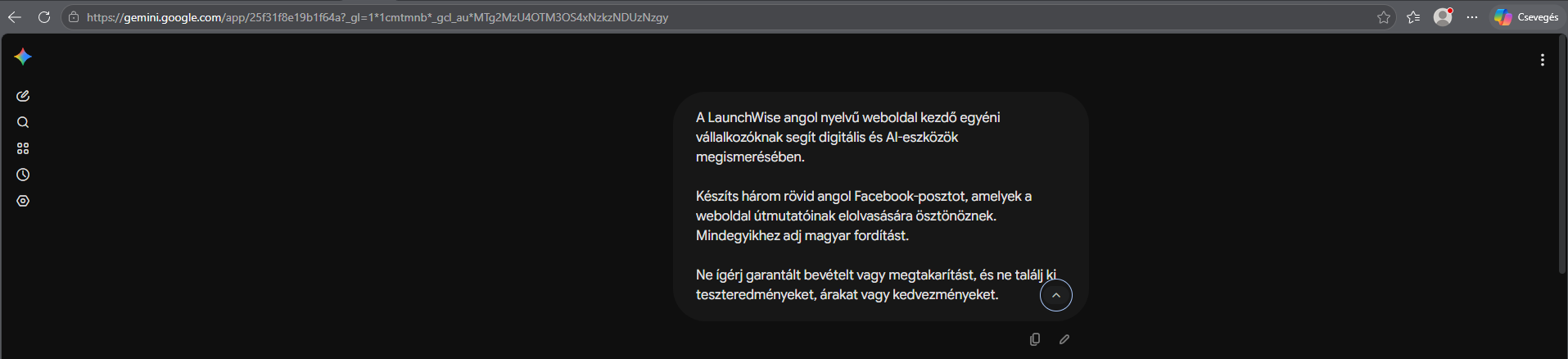
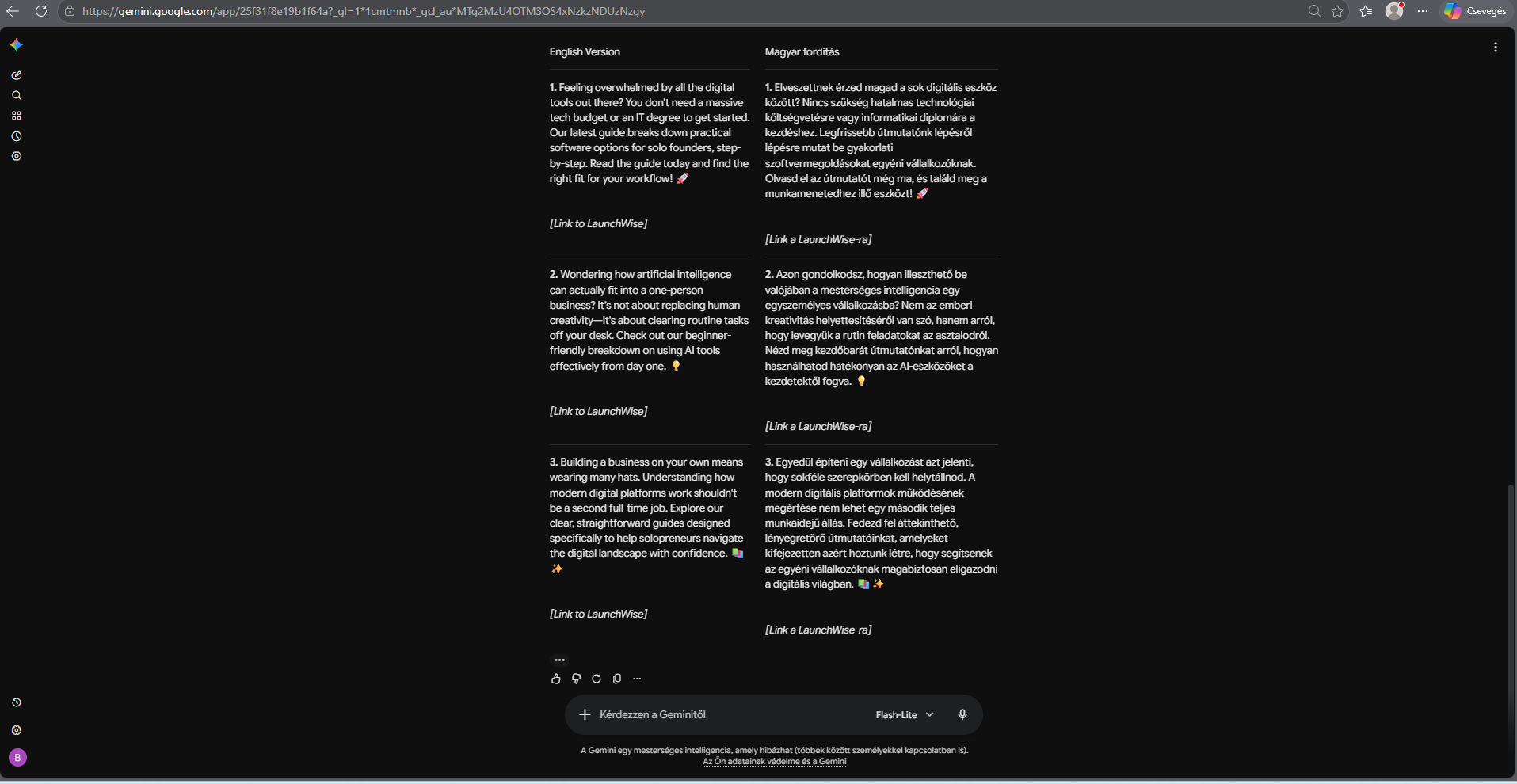
On 2 November 2026, we asked Gemini to write three short English Facebook posts encouraging readers to explore LaunchWise guides, with Hungarian translations for review. The prompt explicitly ruled out guaranteed earnings or savings and invented test results, prices or discounts.
The response supplied three English drafts alongside Hungarian translations. It left link placeholders for us to replace. Before publishing, we would also check that each description matches the linked guide and edit the wording for our audience.
Our assessment: this produced a useful starting point for bilingual content drafting. It did not demonstrate increased traffic, sales or time savings. The screenshot shows Flash-Lite selected; this example does not establish Gemini 4 Argon performance or a benefit exclusive to a paid plan.
These two screenshots belong to the same conversation. Open either image at full size to read the original text.
Google AI Pro: check your account and exact offer
Google’s membership help page states that AI usage limits depend on the feature and plan. It lists personal-account requirements and feature-specific age restrictions, including 18+ requirements for Tasks, Deep Research and Antigravity. Check country availability and any existing-subscription restrictions as well.
Do not infer an offer’s storage, credits, context window or model access from its name alone. Verify those details on the selected offer and the Google confirmation screen. Our historical 5 TB result below is not a promise about another purchase.
Source: Google AI Pro membership and eligibility, checked 2 November 2026.
Compare cost on the same basis
Compare the same plan, country, duration and account arrangement, including renewal charges and cancellation conditions. Our €9.76 purchase was funded by promotional credit; it is not a current price quote or evidence of a particular discount against Google. We have not established a current like-for-like savings figure.
Check the current Gemini offer ↗
Affiliate link · Confirm current eligibility, activation and support terms before purchase.
What happened in our test
- GamsGo product: three-month Gemini gift offer for our own account.
- Checkout total: €9.76, covered entirely by promotional credit; no additional checkout payment.
- Google confirmation: Google AI Pro (5 TB), with a three-month trial.
- Trial end date shown: 31 January 2027.
- Renewal shown: HUF 8,790 per month starting on that date.
- Final Google Play status: cancelled, with access ending on 31 January 2027.
These were the terms displayed to our Hungarian account on 31 October 2026. Your price, eligibility, storage allocation, product name, features and renewal terms may differ. The Google confirmation screen is the place to check your own offer.
1. Choose the correct GamsGo product type
We selected the three-month gift-to-your-own-account option. GamsGo also displayed information about pre-activated accounts, but those instructions did not apply to our purchase. Check the duration and account type before paying.
Our €9.76 purchase used promotional credit. This should not be described as a free GamsGo product: credit funded the purchase, while Google displayed a zero-cost trial period during redemption.
2. Find the private redemption link
After checkout, we opened My Subscriptions in GamsGo. The Gemini subscription card contained a hidden gift link/code field. Clicking its eye icon revealed the redemption information.
Copy your own link privately. Do not publish the code, the complete offer URL, payment information or account credentials in screenshots.
The subscription card linked to the GamsGo redemption guide. At the time of our test, its instructions said the target account should have no active paid Gemini subscription. Check current eligibility before proceeding; purchasing an offer does not establish that your account can redeem it.
3. Check the Google offer before confirming
Our redemption link opened a Google One offer page. We checked the signed-in Google account, trial length, amount due now, future monthly charge and renewal date. The confirmation offered Google AI Pro (5 TB), a three-month trial, followed by HUF 8,790 per month.
A payment method was attached to the Google confirmation. A zero-cost trial can still become a paid subscription when it renews. If the offer differs from the product you purchased, stop before confirming and contact GamsGo support.
4. Activate and verify access
After confirming the subscription, Google displayed a subscribed message and a welcome page saying the membership was ready. We then opened Gemini and successfully received responses on the account.
For our first practical task, Gemini drafted three English homepage introductions with Hungarian translations for LaunchWise. We asked it to revise unsupported claims and used the resulting copy as the basis for our homepage update. This demonstrated a writing workflow; it did not test every advertised feature or establish which model performs best.
5. Cancel automatic renewal in Google Play
Turning off renewal at GamsGo did not cancel the separate Google subscription created during redemption. We opened Google Play subscriptions, selected Google One / Google AI Pro, and chose Manage, then Cancel subscription.
The final confirmation explicitly said our subscription would end on 31 January 2027 and our payment method would not be charged afterward. We confirmed cancellation. The subscriptions list then showed Cancelled and the same end date.
What this test does—and does not—show
The offer activated successfully in our test, and we verified the cancelled renewal status. We have not yet tested access over the full three months, every Gemini feature, support response times, or the outcome for other Google accounts. We cannot guarantee future offer availability or eligibility.
Before you buy
- Check whether the offer is for your account or a supplied account.
- Read eligibility and redemption conditions before purchase.
- Compare the total cost and terms with Google's own available offers.
- Check the renewal amount and date on Google's confirmation.
- If you only want the trial, complete the cancellation process and verify its status.
View the current Gemini offer ↗
Affiliate link · Check the Gemini offer, account eligibility and current terms before purchasing.
GamsGo overview → · Explore practical AI workflows → · Back to LaunchWise